> ## Documentation Index
> Fetch the complete documentation index at: https://hedera-0c6e0218-fix-asset-tokenization-docs.mintlify.site/llms.txt
> Use this file to discover all available pages before exploring further.
# Send and Receive HBAR Using Solidity Smart Contracts
Smart contracts on Hedera can hold and exchange value in the form of HBAR, Hedera Token Service (HTS) tokens, and even ERC tokens. This is fundamental for building decentralized applications that rely on contracts in areas like DeFi, ESG, NFT marketplaces, DAOs, and more.
Let’s learn how to send and receive HBAR to and from Hedera contracts. [Part 1](https://hedera.com/blog/how-to-send-and-receive-hbar-using-smart-contracts-part-1-using-the-sdk) of the series focused on using the Hedera SDKs. This second part goes over transferring HBAR to and from contracts using Solidity.
Follow these main 3 steps:
1. Create the Hedera accounts needed for testing and deploy a smart contract on the Testnet
2. Move HBAR to the contract using ***fallback*** and ***receive*** functions, a ***payable*** function, and the **SDK**
3. Move HBAR from the contract to Alice using the ***transfer***, ***send***, and ***call*** methods
Throughout the tutorial, you also learn how to check the HBAR balance of the contract by calling a function of the contract itself and by using the SDK query. The last step is to review the transaction history for the contract and the operator account in a mirror node explorer, like [HashScan](https://hashscan.io/#/mainnet/dashboard).
***
## Prerequisites
We recommend you complete the following introduction to get a basic understanding of Hedera transactions. This example does not build upon the previous examples.
* Get a [Hedera testnet account](/native/tutorials/getting-started/create-fund-account).
* Set up your environment here.
***
## Table of Contents
1. [Create Accounts and Deploy a Contract](#create-accounts-and-deploy-a-contract)
2. [Get HBAR to ➡ Contract](#getting-hbar-to-the-contract)
3. [Get HBAR from ⬅ Contract](#getting-hbar-from-the-contract)
4. [Summary](#summary)
5. [Additional Resources](#additional-resources)
***
## **Create Accounts and Deploy a Contract**
This example involves 3 Hedera accounts, 1 contract, and 1 Hedera Token Service (HTS) token. The Operator account ([your Testnet account credentials](https://portal.hedera.com/register)) is used to build the Hedera client to submit transactions to the Hedera network – that’s the first account. The Treasury and Alice are new accounts (created by the Operator) to represent additional parties in your test – those are the second and third accounts respectively.
A portion of the application file (***index.js***) and the entire Solidity contract (***hbarToAndFromContract.sol***) are shown in the tabs below.
The Solidity file has functions for getting HBAR to the contract (***receive***, ***fallback***, ***tokenAssociate***), getting HBAR from the contract (***transferHbar***, ***sendHbar***, ***callHbar***), and checking the HBAR balance of the contract (***getBalance***).
This portion of ***index.js*** configures and creates the accounts, deploys the contract, and stores the HTS token ID. The functions ***accountCreatorFcn*** and ***contractDeployFcn*** create new accounts and deploy the contract to the network, respectively. These functions simplify the account creation and contract deployment process and are reusable in case you need them in the future. This modular approach is used throughout the tutorial.
```js index.js theme={null}
// Configure accounts and client
const operatorId = AccountId.fromString(process.env.OPERATOR_ID);
const operatorKey = PrivateKey.fromString(process.env.OPERATOR_PVKEY);
const client = Client.forTestnet().setOperator(operatorId, operatorKey);
async function main() {
// Create other necessary accounts
console.log(`\n- Creating accounts...`);
const initBalance = 100;
const treasuryKey = PrivateKey.generateECDSA();
const [treasuryAccSt, treasuryId] = await accountCreatorFcn(
treasuryKey,
initBalance
);
console.log(
`- Created Treasury account ${treasuryId} that has a balance of ${initBalance} ℏ`
);
const aliceKey = PrivateKey.generateECDSA();
const [aliceAccSt, aliceId] = await accountCreatorFcn(aliceKey, initBalance);
console.log(
`- Created Alice's account ${aliceId} that has a balance of ${initBalance} ℏ`
);
// Import the compiled contract bytecode
const contractBytecode = fs.readFileSync("hbarToAndFromContract.bin");
// Deploy the smart contract on Hedera
console.log(`\n- Deploying contract...`);
let gasLimit = 100000;
const [contractId, contractAddress] = await contractDeployFcn(
contractBytecode,
gasLimit
);
console.log(`- The smart contract ID is: ${contractId}`);
console.log(
`- The smart contract ID in Solidity format is: ${contractAddress}`
);
const tokenId = AccountId.fromString("0.0.47931765");
console.log(`\n- Token ID (for association with contract later): ${tokenId}`);
}
main();
```
```solidity hbarToAndFromContract.sol theme={null}
// SPDX-License-Identifier: GPL-3.0
pragma solidity >=0.7.0 <0.9.0;
// Compile with remix for remote imports to work - otherwise keep precompiles locally
import "https://github.com/hiero-ledger/hiero-contracts/blob/main/contracts/token-service/HederaTokenService.sol";
import "https://github.com/hiero-ledger/hiero-contracts/blob/main/contracts/common/HederaResponseCodes.sol";
contract hbarToAndFromContract is HederaTokenService{
//============================================
// GETTING HBAR TO THE CONTRACT
//============================================
receive() external payable {}
fallback() external payable {}
function tokenAssociate(address _account, address _htsToken) payable external {
require(msg.value > 2000000000,"Send more HBAR");
int response = HederaTokenService.associateToken(_account, _htsToken);
if (response != HederaResponseCodes.SUCCESS) {
revert ("Token association failed");
}
}
//============================================
// GETTING HBAR FROM THE CONTRACT
//============================================
function transferHbar(address payable _receiverAddress, uint _amount) public {
_receiverAddress.transfer(_amount);
}
function sendHbar(address payable _receiverAddress, uint _amount) public {
require(_receiverAddress.send(_amount), "Failed to send Hbar");
}
function callHbar(address payable _receiverAddress, uint _amount) public {
(bool sent, ) = _receiverAddress.call{value:_amount}("");
require(sent, "Failed to send Hbar");
}
//============================================
// CHECKING THE HBAR BALANCE OF THE CONTRACT
//============================================
function getBalance() public view returns (uint) {
return address(this).balance;
}
}
```
These helper functions in ***index.js*** use the [**AccountCreateTransaction()**](/native/accounts/create#create-an-account-via-an-account-alias) and [**ContractCreateFlow()**](/native/smart-contracts/create#contractcreateflow) classes of the Hedera SDK. [**ContractCreateFlow()**](/native/smart-contracts/create#contractcreateflow) stores the bytecode and deploys the contract on Hedera. This single call handles for you the operations [**FileCreateTransaction()**](/native/files/create), [**FileAppendTransaction()**](/native/files/append), and [**ContractCreateTransaction()**](/native/smart-contracts/create#contractcreatetransaction).
**Helper Functions:**
```javascript AccountCreatorFcn theme={null}
async function accountCreatorFcn(pvKey, iBal) {
const response = await new AccountCreateTransaction()
.setInitialBalance(new Hbar(iBal))
.setKey(pvKey.publicKey)
.execute(client);
const receipt = await response.getReceipt(client);
return [receipt.status, receipt.accountId];
}
```
```javascript ContractDeployFcn theme={null}
async function contractDeployFcn(bytecode, gasLim) {
const contractCreateTx = new ContractCreateFlow()
.setBytecode(bytecode)
.setGas(gasLim);
const contractCreateSubmit = await contractCreateTx.execute(client);
const contractCreateRx = await contractCreateSubmit.getReceipt(client);
const contractId = contractCreateRx.contractId;
const contractAddress = contractId.toSolidityAddress();
return [contractId, contractAddress];
}
```
* *Creating accounts...* \* *Created Treasury account 0.0.47938602 that has a
balance of 100 ℏ* \* *Created Alice's account 0.0.47938603 that has a balance
of 100 ℏ* \* *Deploying contract...* \* *The smart contract ID is: 0.0.47938605*
* *The smart contract ID in Solidity format is:
0000000000000000000000000000000002db7c2d* \* *Token ID (for association with
contract later): 0.0.47931765*
***
## **Getting HBAR to the Contract**
### **The receive/fallback** Functions
In this scenario, you (Operator) transfer 10 HBAR to the contract by triggering either the ***receive*** or ***fallback*** functions of the contract. As described in this [Solidity by Example](https://solidity-by-example.org/sending-ether/) page, the ***receive*** function is called when ***msg.data*** is empty, otherwise the ***fallback*** function is called.
In this case, the helper function ***contractExecuteNoFcn*** pays HBAR to the contract by using [**ContractExecuteTransaction()**](/native/smart-contracts/call) and specifying a ***.setPayableAmount()*** without calling any specific contract function – thus triggering ***fallback***. Note from the Solidity code that ***receive*** and ***fallback*** are ***external*** and ***payable*** functions.
The helper function ***contractCallQueryFcn*** checks the HBAR balance of the contract by calling the ***getBalance*** function of the contract – this call is done using [**ContractCallQuery()**](/native/smart-contracts/get-function).
```javascript wrap theme={null}
console.log(`
====================================================
GETTING HBAR TO THE CONTRACT
====================================================`);
// Transfer HBAR to the contract using .setPayableAmount WITHOUT specifying a function (fallback/receive triggered)
let payableAmt = 10;
console.log(
`- Caller (Operator) PAYS ${payableAmt} ℏ to contract (fallback/receive)...`
);
const toContractRx = await contractExecuteNoFcn(
contractId,
gasLimit,
payableAmt
);
// Get contract HBAR balance by calling the getBalance function in the contract AND/OR using ContractInfoQuery in the SDK
await contractCallQueryFcn(contractId, gasLimit, "getBalance"); // Outputs the contract balance in the console
```
**Helper Functions:**
```javascript ContractExecuteNoFcn theme={null}
async function contractExecuteNoFcn(cId, gasLim, amountHbar) {
const contractExecuteTx = new ContractExecuteTransaction()
.setContractId(cId)
.setGas(gasLim)
.setPayableAmount(amountHbar);
const contractExecuteSubmit = await contractExecuteTx.execute(client);
const contractExecuteRx = await contractExecuteSubmit.getReceipt(client);
return contractExecuteRx;
}
```
```javascript ContractCallQueryFcn theme={null}
async function contractCallQueryFcn(cId, gasLim, fcnName) {
const contractQueryTx = new ContractCallQuery()
.setContractId(cId)
.setGas(gasLim)
.setFunction(fcnName);
const contractQuerySubmit = await contractQueryTx.execute(client);
const contractQueryResult = contractQuerySubmit.getUint256(0);
console.log(
`- Contract balance (getBalance fcn): ${contractQueryResult * 1e-8} ℏ`
);
}
```
*====================================================*
*GETTING HBAR TO THE CONTRACT*
*====================================================*
* *Caller (Operator) PAYS 10 ℏ to contract (fallback/receive)...*
* *Contract balance (getBalance fcn): 10 ℏ*
### **Executing a Payable Function**
Now, you (Operator) transfer 21 HBAR to the contract by calling a specific contract function (***tokenAssociate***) that is ***payable*** using the [**ContractExecuteTransaction()**](/native/smart-contracts/call) class and specifying a ***.setPayableAmount()***. This is done with the helper function ***contractExecuteFcn***.
In this scenario, ***contractParamsBuilderFcn*** is used to build the parameters that will be passed to the contract function – that is, the contract and token IDs which are then converted to Solidity addresses.
From the Solidity code, note that the ***tokenAssociate*** function associates the contract to the HTS token from the first step, and requires more than 20 HBAR to execute (just for fun).
```javascript theme={null}
// Transfer HBAR to the contract using .setPayableAmount SPECIFYING a contract function (tokenAssociate)
payableAmt = 21;
gasLimit = 800000;
console.log(
`\n- Caller (Operator) PAYS ${payableAmt} ℏ to contract (payable function)...`
);
const Params = await contractParamsBuilderFcn(contractId, [], 2, tokenId);
const Rx = await contractExecuteFcn(
contractId,
gasLimit,
"tokenAssociate",
Params,
payableAmt
);
gasLimit = 50000;
await contractCallQueryFcn(contractId, gasLimit, "getBalance"); // Outputs the contract balance in the console
```
```javascript ContractParamsBuilderFcn theme={null}
async function contractParamsBuilderFcn(aId, amountHbar, section, tId) {
let builtParams = [];
if (section === 2) {
builtParams = new ContractFunctionParameters()
.addAddress(aId.toSolidityAddress())
.addAddress(tId.toSolidityAddress());
} else if (section === 3) {
builtParams = new ContractFunctionParameters()
.addAddress(aId.toSolidityAddress())
.addUint256(amountHbar * 1e8);
} else {
}
return builtParams;
}
```
```javascript ContractExecuteFcn theme={null}
async function contractExecuteFcn(cId, gasLim, fcnName, params, amountHbar) {
const contractExecuteTx = new ContractExecuteTransaction()
.setContractId(cId)
.setGas(gasLim)
.setFunction(fcnName, params)
.setPayableAmount(amountHbar);
const contractExecuteSubmit = await contractExecuteTx.execute(client);
const contractExecuteRx = await contractExecuteSubmit.getReceipt(client);
return contractExecuteRx;
}
```
* *Caller (Operator) PAYS 21 ℏ to contract (payable function)...* \* *Contract
balance (getBalance fcn): 31 ℏ*
### **Using `TransferTransaction`** in the SDK
Lastly in this scenario, the Treasury transfers 30 HBAR to the contract using [**TransferTransaction()**](/native/accounts/transfer)**.** This is done with the helper function ***hbar2ContractSdkFcn***. This scenario is just a quick recap and reminder of [Part 1 of the series](https://hedera.com/blog/how-to-send-and-receive-hbar-using-smart-contracts-part-1-using-the-sdk), so be sure to give that a read for more details.
```javascript theme={null}
// Transfer HBAR from the Treasury to the contract deployed using the SDK
let moveAmt = 30;
const transferSdkRx = await hbar2ContractSdkFcn(
treasuryId,
contractId,
moveAmt,
treasuryKey
);
console.log(
`\n- ${moveAmt} ℏ from Treasury to contract (via SDK): ${transferSdkRx.status}`
);
await contractCallQueryFcn(contractId, gasLimit, "getBalance"); // Outputs the contract balance in the console
```
**Helper Functions:**
```javascript theme={null}
async function hbar2ContractSdkFcn(sender, receiver, amount, pKey) {
const transferTx = new TransferTransaction()
.addHbarTransfer(sender, -amount)
.addHbarTransfer(receiver, amount)
.freezeWith(client);
const transferSign = await transferTx.sign(pKey);
const transferSubmit = await transferSign.execute(client);
const transferRx = await transferSubmit.getReceipt(client);
return transferRx;
}
```
* *30 ℏ from Treasury to contract (via SDK): SUCCESS* \* *Contract balance
(getBalance fcn): 61 ℏ*
***
## **Getting HBAR from the Contract**
In this section the contract transfers HBAR to Alice using three different methods: ***transfer***, ***send***, ***call***. Each transfer is of 20 HBAR, so by the end the contract should have 1 HBAR left in its balance.
This tutorial focuses on implementation. For additional background and details of these Solidity methods, check out [Solidity by Example](https://solidity-by-example.org/sending-ether/) and [this external article](https://medium.com/daox/three-methods-to-transfer-funds-in-ethereum-by-means-of-solidity-5719944ed6e9) – just remember that on Hedera, the native cryptocurrency transacted is HBAR, not ETH. One thing worth noting from those resources is that ***call*** is currently the recommended method to use.
### **Contract Transfers HBAR to Alice**
The helper function ***contractExecuteFcn*** executes the ***transferHbar*** function of the contract. The helper function ***contractParamsBuilderFcn*** now builds the contract function parameters from the receiver ID (Alice’s) and the amount of HBAR to be sent. Also note from the previous section that the contract function is executed with a ***gasLimit*** of only 50,000 gas.
```javascript theme={null}
console.log(`
====================================================
GETTING HBAR FROM THE CONTRACT
====================================================`);
payableAmt = 0;
moveAmt = 20;
console.log(`- Contract TRANSFERS ${moveAmt} ℏ to Alice...`);
const tParams = await contractParamsBuilderFcn(aliceId, moveAmt, 3, []);
const tRx = await contractExecuteFcn(
contractId,
gasLimit,
"transferHbar",
tParams,
payableAmt
);
// Get contract HBAR balance by calling the getBalance function in the contract AND/OR using ContractInfoQuery in the SDK
await showContractBalanceFcn(contractId); // Outputs the contract balance in the console
```
**Helper Functions:**
```javascript theme={null}
async function showContractBalanceFcn(cId) {
const info = await new ContractInfoQuery().setContractId(cId).execute(client);
console.log(`- Contract balance (ContractInfoQuery SDK): ${info.balance.toString()}`);
```
*====================================================*
*GETTING HBAR FROM THE CONTRACT*
*====================================================*
* *Contract TRANSFERS 20 ℏ to Alice...*
* *Contract balance (ContractInfoQuery SDK): 41 ℏ*
### **Contract Sends HBAR to Alice**
The same helper function from before now executes the ***sendHbar*** function of the contract.
```javascript theme={null}
console.log(`\n- Contract SENDS ${moveAmt} ℏ to Alice...`);
const sParams = await contractParamsBuilderFcn(aliceId, moveAmt, 3, []);
const sRx = await contractExecuteFcn(
contractId,
gasLimit,
"sendHbar",
sParams,
payableAmt
);
await showContractBalanceFcn(contractId); // Outputs the contract balance in the console
```
* *Contract SENDS 20 ℏ to Alice...* \* *Contract balance (ContractInfoQuery
SDK): 21 ℏ*
### **Contract Calls HBAR to Alice**
Just like above, the helper function ***contractExecuteFcn*** executes the ***sendHbar*** function of the contract.
Examine the transaction history for the contract and the operator in the mirror node explorer, [HashScan](https://hashscan.io/#/mainnet/dashboard). You can also obtain additional information of interest using the [mirror node REST API](/reference/rest-api). Additional context for that API is provided in [this blog post](https://hedera.com/blog/how-to-look-up-transaction-history-on-hedera-using-mirror-nodes-back-to-the-basics).
The last step is to [**join the Hedera Developer Discord!**](https://hedera.com/discord)
```javascript theme={null}
console.log(`\n- Contract CALLS ${moveAmt} ℏ to Alice...`);
const cParams = await contractParamsBuilderFcn(aliceId, moveAmt, 3, []);
const cRx = await contractExecuteFcn(contractId, gasLimit, "callHbar", cParams, payableAmt);
await showContractBalanceFcn(contractId); // Outputs the contract balance in the console
console.log(`\n- SEE THE TRANSACTION HISTORY IN HASHSCAN (FOR CONTRACT AND OPERATOR):
https://hashscan.io/#/testnet/contract/${contractId}
https://hashscan.io/#/testnet/account/${operatorId}`);
console.log(`
====================================================
THE END - NOW JOIN: https://hedera.com/discord
====================================================\n`);
}
```
* *Contract CALLS 20 ℏ to Alice...*
* *Contract balance (ContractInfoQuery SDK): 1 ℏ*
* *SEE THE TRANSACTION HISTORY IN HASHSCAN (FOR CONTRACT AND OPERATOR):*
[*https://hashscan.io/#/testnet/contract/0.0.47938605*](https://hashscan.io/#/testnet/contract/0.0.47938605)[*https://hashscan.io/#/testnet/account/0.0.2520793*](https://hashscan.io/#/testnet/account/0.0.2520793)
***
## **Summary**
If you run the entire example successfully, your console should look something like:
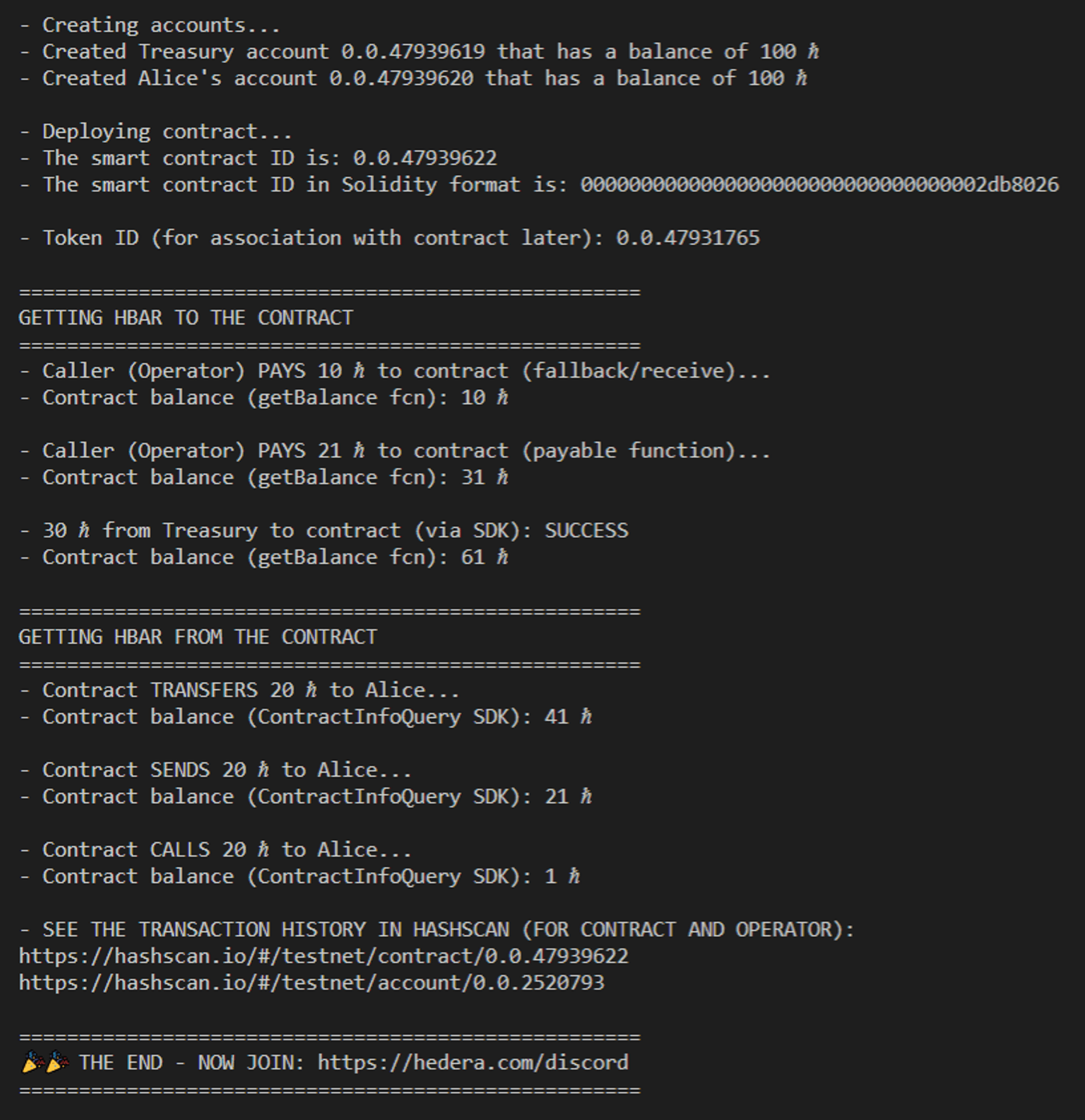 This tutorial used the Hedera JavaScript SDK. However, you can try this with the other officially supported [SDKs](/native/fundamentals) for Java and Go.
**Congratulations! 🎉 Now you know how to send HBAR to and from a contract on Hedera using both the SDK and Solidity! Feel free to reach out in** [**Discord**](https://hedera.com/discord) **if you have any questions!**
***
## Additional Resources
**➡** [**Project Repository**](https://github.com/ed-marquez/hedera-smart-contracts/tree/examples/examples/transfer-hbar2contracts-solidity)
[GitHub](https://github.com/ed-marquez) |
[LinkedIn](https://www.linkedin.com/in/ed-marquez/)
[GitHub](https://github.com/theekrystallee) |
[Hashnode](https://hashnode.com/@theekrystallee)
This tutorial used the Hedera JavaScript SDK. However, you can try this with the other officially supported [SDKs](/native/fundamentals) for Java and Go.
**Congratulations! 🎉 Now you know how to send HBAR to and from a contract on Hedera using both the SDK and Solidity! Feel free to reach out in** [**Discord**](https://hedera.com/discord) **if you have any questions!**
***
## Additional Resources
**➡** [**Project Repository**](https://github.com/ed-marquez/hedera-smart-contracts/tree/examples/examples/transfer-hbar2contracts-solidity)
[GitHub](https://github.com/ed-marquez) |
[LinkedIn](https://www.linkedin.com/in/ed-marquez/)
[GitHub](https://github.com/theekrystallee) |
[Hashnode](https://hashnode.com/@theekrystallee)